Hand off the work
your team
shouldn't be doing
Sullivam puts digital workers in your back office to run repetitive processes from start to finish.
Start with Invoice Worker.
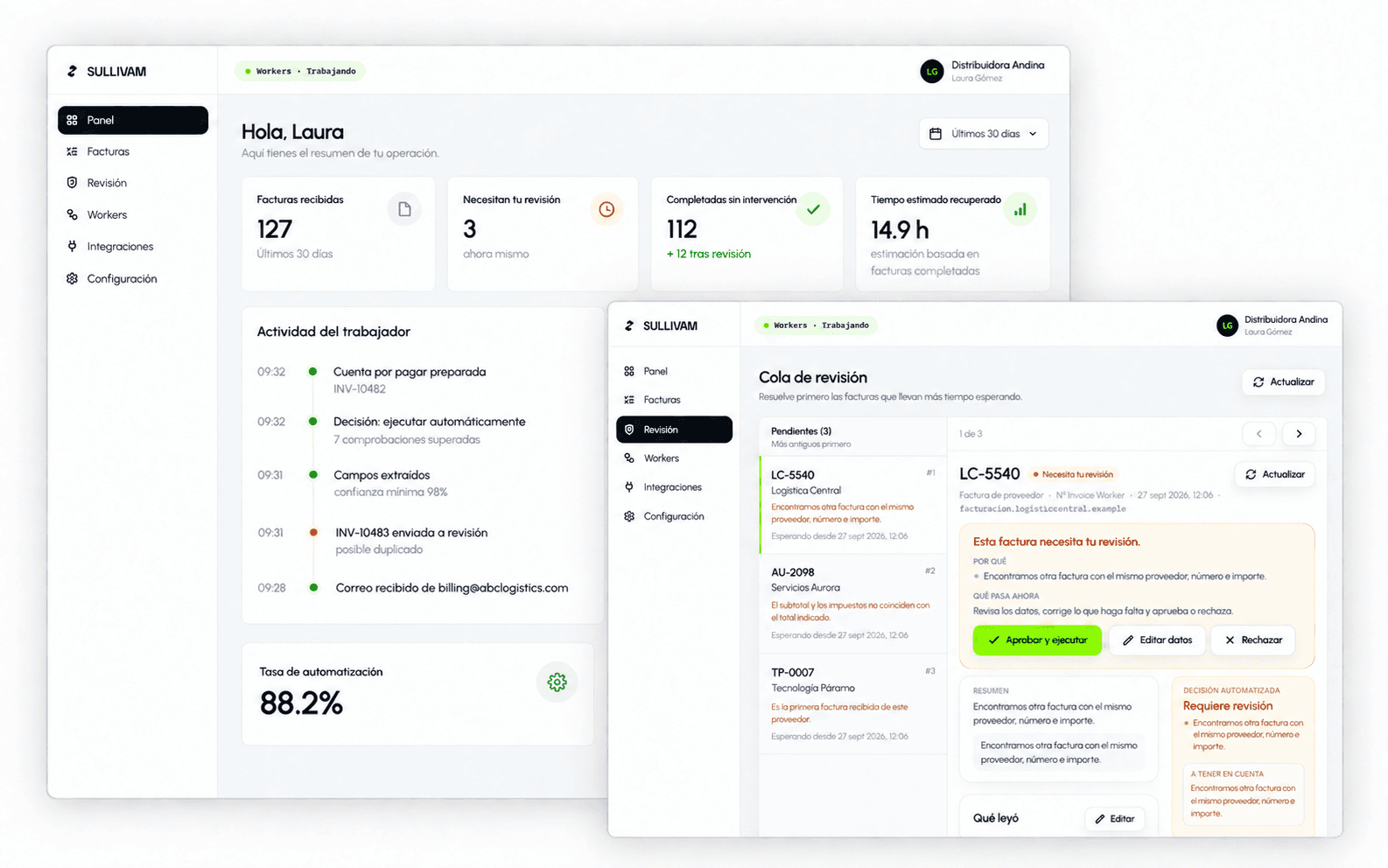
An invoice lands at 9:17
What happens next depends on who has time to open it. With Sullivam, it depends on your rules.
Today, by hand
- 9:17An invoice lands in the shared inbox, buried among forty other emails.
- 11:40Someone opens it, downloads the PDF and retypes the vendor, invoice number and amounts.
- 12:05They look up the purchase order and check whether it was already entered.
- Next dayIf something doesn't match, it sits in an email thread until someone asks.
With Sullivam
- 9:17The invoice arrives and Sullivam picks it up on the spot.
- 9:17It classifies it, extracts the fields and checks the amounts, duplicates, the vendor and, if you require one, the purchase order.
- 9:18If everything matches your rules, it prepares the entry with its evidence.
- 9:18If not, it sends it to review with the exact reason. Nothing runs blind.
Illustrative walkthrough; the times are not customer measurements.
Hours of copy and paste
Skilled people moving data from email into the system.
Errors that slip through
Duplicates, unmatched purchase orders, totals that don't add up.
A queue that never stops
The same documents arrive every day, and the inbox only grows.
Watch Sullivam work an invoice from start to finish
Sullivam doesn't stop at reading the document. It turns it into a decision and, when appropriate, into an action.
01 · Input
Invoice INV-10482.pdf
billing@vendor.example
Just another email in the billing inbox. Nobody forwards it, nobody opens it.
02 · Sullivam
- ReadsEmail + attached PDF, treated as data and never as instructions
- ClassifiesVendor invoice · high confidence
- ExtractsVendor, number, dates, amounts and purchase order
- Validates4,000 + 760 = 4,760 ✓ · no duplicates ✓ · purchase order PO-8831 present ✓
- DecidesEverything matches and clears the threshold: safe to execute
03 · Outcome
Outcome · everything matches
Payable prepared
ABC Logistics · $4,760.00 · due Aug 31. Ready for your books, with the audit trail already written. Nobody had to look at it.
Review · something doesn't match
Straight to your review queue
With the exact reason: “possible duplicate”, “missing purchase order”. You correct and approve; Sullivam carries on.
Illustrative example of an Invoice Worker run. Sullivam prepares the accounting entry; it never makes payments or touches bank details.
Invoice Worker: from the inbox to a traceable decision
It receives invoices from Outlook, extracts the data, checks your rules and prepares the entry. It only brings in a person when something needs attention.
- 01Outlook
- 02Invoice
- 03Validation
- 04Decision
- 05Record
When it's confident
Sullivam continues automatically under the rules you set and prepares the entry with its evidence and audit trail.
Sullivam never makes payments or touches bank details. It leaves the entry ready for accounting.
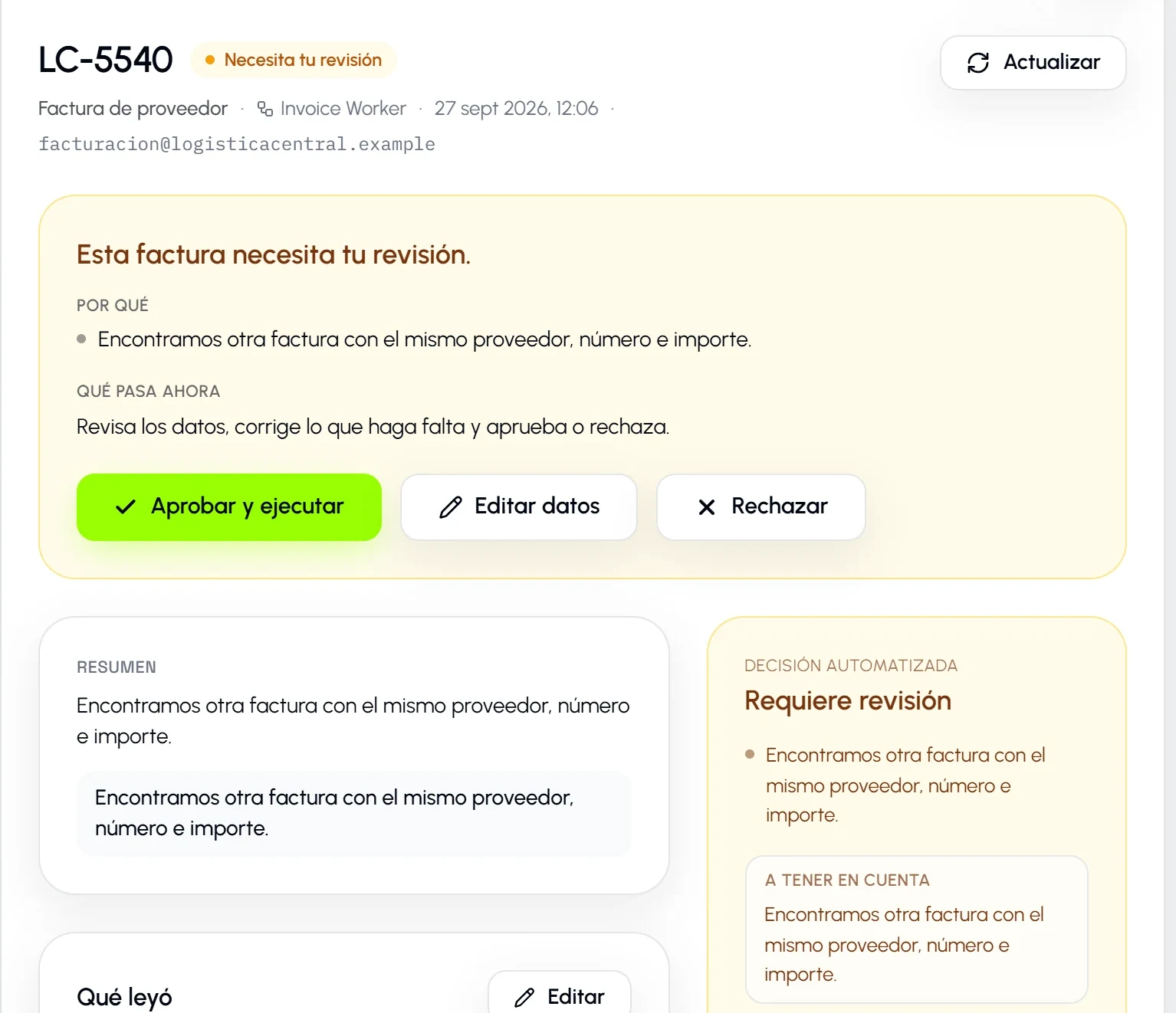
When it isn't
Sullivam stops, explains why and asks for human review. You correct, approve or reject, and the decision is recorded.
Human review isn't a system failure. It's part of the product.
Your back office doesn't end at invoices.
Sullivam is a digital worker platform. Invoice Worker is the first; every new Worker runs on the same foundation: receive, understand, validate, decide, execute and record.
01 — Finance
Invoices · payables · collections · expenses · reconciliations
Available · Invoice Worker02 — Operations
Vendors · requests · documents · records
Coming later03 — Procurement
Requests · purchase orders · vendor validation
Coming later04 — Legal
Contracts · clauses · renewals · compliance
Coming later05 — People
Employee onboarding · documents · internal requests
Coming later06 — Support
Email · tickets · triage · follow-up
Coming later
Is your process not a standard Worker yet? Custom automation
A worker that knows when to act and when to stop
It interprets the document, applies deterministic checks and keeps a person in the loop whenever there's uncertainty.
- 01
Understands documents
Real PDFs, emails and attachments.
- 02
Checks rules
Amounts, dates, duplicates, vendors and the purchase order when you require one.
- 03
Takes action
Prepares entries and carries out the steps you've authorized.
- 04
Asks for help when needed
If something doesn't match, it explains why and sends it to review.
Connects where the work already lives
Sullivam starts with Microsoft Outlook and Microsoft 365, and adds more of your company's systems as we connect them.
Available today
- Available
Microsoft Outlook
Email
- Available
Microsoft 365 / Graph
Productivity
Roadmap
- On the roadmap
Webhooks and REST
Custom
- On the roadmap
Google Workspace
Email
- On the roadmap
SharePoint
Storage
- On the roadmap
QuickBooks
Accounting
- On the roadmap
SAP / NetSuite
ERP
Anything marked available works today; the rest is on the roadmap, and we don't sell it as done. REST and customer webhooks are on the roadmap too.
Need a process that isn't a Worker yet?
We assess it and, if it's feasible, implement it on the same platform: your rules, human review when there's doubt and every step recorded. Business processes only, not custom software development.
Priced per project
What you can verify on day one
Sullivam is new, and we don't invent customer numbers. This is what the product does, and you can check it yourself.
- 8 steps
- From trigger to audit
- Every job runs through the same cycle and stores the result of each step.
- Clear rules
- Checks that fit the process
- Amounts, dates, currency, duplicates, vendor and purchase order are checked where they apply.
- Never moves money
- No access to bank accounts
- Sullivam prepares and records the work. It doesn't make payments or touch your bank accounts.
- Automatic processing
- As each invoice arrives
- Work starts when it arrives, not when someone gets around to the inbox.
- Isolated by organizationEach company sees only its own data, Workers and work.
- Human review when in doubtIf something doesn't match, Sullivam stops and asks for a decision.
- Nothing runs blindAn action only proceeds if it passes the checks in your rules.
- Every step is recordedIntake, extraction, validation, decision and outcome, with an audit trail.
3 spots open in this cohort
We're selecting the first companies that will run Sullivam in production.
30 days free
to implement Invoice Worker, with hands-on support from our team.
- Implementation guided by our team
- Direct access to the people building Sullivam
- Preferred terms after the program, as agreed
The program is limited to 10 founding companies in total. This first cohort opens just 3 spots.
Subject to a review of your process and operating volume.
Questions, answered
What exactly is Sullivam?
A digital worker platform for repetitive back-office operations. Its first product is Invoice Worker, which processes invoices received by email.
Does Sullivam only process invoices?
Today, the available Worker is Invoice Worker, for vendor invoices. Sullivam is a digital worker platform for the back office: the next Workers run on the same foundation of rules, human review and audit trail. If your process isn't a standard Worker yet, you can request a custom automation.
What happens when Sullivam isn't sure?
The job stops and goes to review with the document, the extracted data and a specific explanation. A person corrects, approves or rejects it before anything continues.
Which systems does it connect to?
Today it connects to Microsoft Outlook and Microsoft 365. The REST API, customer webhooks and the other integrations on this page are on the roadmap.
Is my data safe?
Access is limited to your organization, documents are kept in private storage and every important action is recorded for audit. We don't use your documents to train models. The details are on the security page and in the list of subprocessors.
How is it priced?
A monthly plan based on your invoice volume: each plan includes a number of invoices per month, and additional ones are billed per unit. Prices are on the pricing page. Payments are processed by our payment provider, and Sullivam never stores card details.
Does Sullivam move money?
No. Invoice Worker prepares and records the work, but it doesn't make payments or access your bank accounts.
How does the founding program work?
The program is limited to 10 founding companies in total. This first cohort opens just 3 spots. With each selected company, we implement Invoice Worker on a real process, with 30 days free. After that, each founding company continues on a public plan with the preferred terms we agree on. Subject to a review of your process and operating volume.
Give Sullivam its first process.
Start with Invoice Worker. Add more Workers as your operation needs them.